Getting Started By Configuring Your Environment
Environment Setup

 Check Your YAML Before It Checks You
  The Long Road Ahead
  Python Support Has Arrived
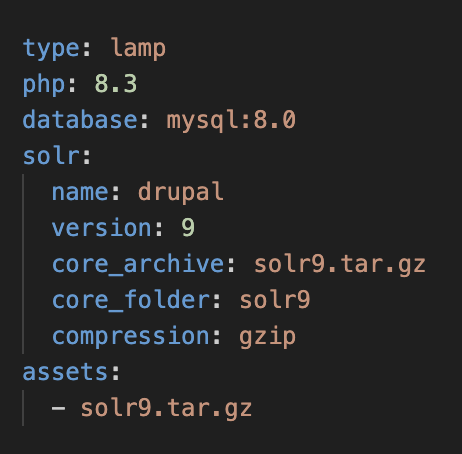
Probo environments can be configured based on the application you are building. These are defined in the .probo.yaml file that lives in the git root directory for your application. These are typically defined before any build steps as to set the stage for what you are building. The environment is defined by root level configurations in the YAML file. The following tags are available for environment configuration:
image (deprecated)assetsphpnodejsdotnettypedatabasesolrimage is a deprecated tag that is used to define the base image for your environment. Using this tag is no longer recommendedand you should use the environment configuration variables below. They image tag will soon be removed from Probo.CI and as such, will be ignored. Currently, USING THIS TAG WILL OVERRIDE ALL OTHER ROOT TAGS WITH THE EXCEPTION OF assets. Simply put, you can configure it to use a specific image, or the build configurations. You will need to remove your image declarations to use the other options.
assets are assets that you have uploaded via the Probo.CI Portal. You can specify multiple assets depending on your needs. Here is an example of an asset definition:
This would include an uploaded Solr 9 core and a database dump for importing. These assets are typically used by other root tags or build steps for their implementation but can also include any files you need to construct and/or run your application. We recommend keeping this as lean as possible since included assets are calculated into your Probo.CI build sizes and go against your build limits.
type defines the type of environment you are building. The currently supported types are node, dotnet, lamp, python, ruby, and static.
php defines the version of PHP to be used for your application. PHP versions 5.6 through 8.5 are supported and available. You can currently only run one build per version of PHP - so to test the same application with a different version of PHP, you will need to change the version number here and redo your Probo build.
nodejs defines the version of Node.js to be used for your application. Node.js versions 6 through 22 are supported and available. You can currently only run one build per version of Node.js - so to test the same application with a different version of Node.js, you will need to change the version number here and redo your Probo build. However, because nvm is installed as part of Probo, you can use nvm install <version> to install and use any version of Node.js for the build specific build step. For more information on the best way to do this, see our documentation on Node.js Build Steps.
dotnet defines the version of .NET to be used for your application. .NET versions 6 through 8 are supported and available. You can currently only run one build per version of .NET - so to test the same application with a different version of .NET, you will need to change the version number here and redo your Probo build. For more informationm on dotnet options, see our documentation on .NET Build Steps.
database defines the database type to be used for your application. The currently supported types are mysql, postgres, and mariadb. You can also specify the version of the database to be used by appending the version number to the type. For example, mysql:8.0 will use MySQL version 8.0. You must specify a version of the database to be used. Versions supported are as follows:
This page will be updated as new versions are released and old versions are removed.
Special Note on MySQL 5.7
MySQL 5.7 is no longer supported by MySQL but is provided here for legacy applications that depend on it and it works as well as any of the other options. However, it consumes about 2gb of quota space for each build. We realize this is quite resource intensive, but such is the nature of the custom compiled version of MySQL to work with later versions of Ubuntu Linux.
solr defines the version of Solr to be used for your application. You can use any version of Solr from 5 through 9. Note that only the latest version of these versions are available, so you only need to provide the major version number. For example, solr:8 will use Solr version 8.11.4. You must specify a version of Solr to be used. Here is an example of a Solr definition:
1 2 3 4 5 6 7 8 9 10 11 | solr: # The version of Solr to use version: 9 # The name of the Solr core to be configured name: my-core # The archive file (asset) for your solr core core_archive: solr9.tar.gz # The folder that the core will be extracted to core_folder: solr9 # The type of compression used (zip and gzip are supported) compression: gzip |
Probo.CI builds are constructed off a base Docker container that has configured items added to it. As a general rule, each type has its own base container where applicable to reduce overhead. In some cases, items such as redis are all available on all types and you can configure Solr and a database in any type. Containers are built using the latest LTS version of Ubuntu Linux. When adding scripting or other bash instructions to your .probo.yaml file, you will want to be sure they fit within this paradigm. For example, Ubuntu relies on the apt package manager to install packages, so you will want to use apt install to install packages.

When you sign up for a Probo.CI registration code, you will get a two week trial of the plan of your choosing. For more information on how to get started, click here .
LEARN MORE ABOUT PROBO.CI'S PRICING