Elevating Your Users
Probo Admins

 Check Your YAML Before It Checks You
  The Long Road Ahead
  Python Support Has Arrived
Probo Admins are Probo users who can perform administrative actions on your Probo Organization. An Organization’s initial Admin is the Probo user who first activated a repository in that Organization. Organization Admins can add or remove further Admins in the Organization’s Manage Administrators tab.
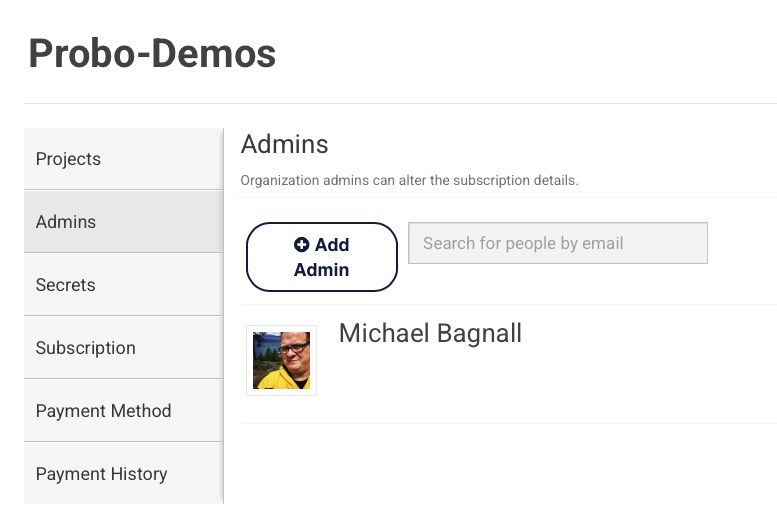
Probo Organizations are separate entities from the organizations on your git hosting provider (GitHub, Bitbucket, or GitLab). Any person who has a Probo user account (created when they first log in to the app via OAuth) can be made an Admin for a given Organization, even if they aren’t part of your git hosting provider’s organization. For example, a Probo user who is not part of your GitHub organization can be added as an Admin to your Probo Organization.
This separation of concerns will eventually allow non-developers to sign up as Probo users so they can be made Organization Admins. For example, an employee from the billing department could log in directly to handle subscriptions and payment methods, view payment history, and more — all without needing a user account in your git hosting provider’s organization.
Note: Admins are not automatically synchronized from git repository organizations to your Probo Organization. For example, admins in your GitHub organization are not automatically made Admins in your Probo Organization.
In your Organization’s Manage Administrators tab, use the autocomplete field to search for the Probo users you want to make Admins in your Probo Organization.

Probo Organization Admins can be deleted by clicking the red X to the right of the user’s information card on the Organization’s Manage Administrators tab.
Note: Removing a user as an admin from your git organization will not automatically remove them as an Admin on the related Probo Organization.

When you sign up for a Probo.CI registration code, you will get a two week trial of the plan of your choosing. For more information on how to get started, click here .
LEARN MORE ABOUT PROBO.CI'S PRICING