Using Probo with GitHub
GitHub

 Check Your YAML Before It Checks You
  The Long Road Ahead
  Python Support Has Arrived
Probo integrates with GitHub to automatically create live build environments whenever your team opens or updates a pull request. No manual steps required - Probo watches your repository and kicks off a build the moment there is something to review.
How Probo Connects to Your Repository
When you add a project to Probo.CI, Probo registers a webhook on your GitHub repository. This webhook is how GitHub notifies Probo whenever something happens - a pull request is opened, a branch is pushed to, a PR is closed, and so on.
The webhook is created automatically when you connect a repository through the Probo portal. You do not need to configure it manually. Probo uses GitHub’s OAuth flow to authenticate and request the permissions it needs to manage the webhook and report build status back to your pull requests.
Permissions Probo requests:
repo - to read your repository contents, register webhooks, and post build status back to your pull requestsuser:email - to identify the user connecting the repositoryWhat Probo Watches For
Once connected, Probo listens for the following GitHub events:
Pull request events
| Action | What Probo Does |
|---|---|
| Opened | Creates a new build environment for the PR |
| Updated (new commits pushed) | Creates a fresh build for the latest commit |
| Closed or merged | Begins releasing the build environment and freeing up storage |
Push events
Probo can also trigger builds when commits are pushed directly to a branch, without a pull request. To trigger a push-based build, include [build] in your commit message.
Branch deletions and pushes without commits are ignored.
Build Status in GitHub
After Probo starts a build, it posts a status update back to your pull request. Each build step shows up individually in the pull request’s checks area, and the status updates in real time as each step runs.
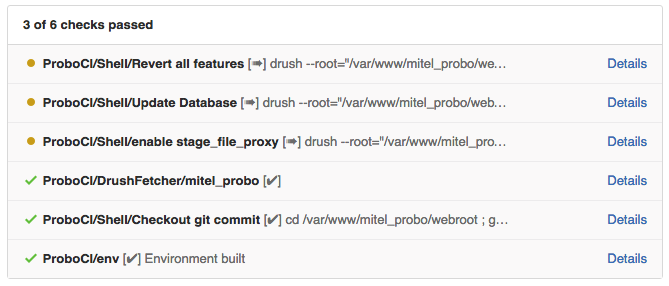
Each step shows whether it passed or failed. Click the Details link next to any step to open the Probo portal, where you can see the full console output for that step and access the live build environment URL to preview the changes.
Enabling and Disabling the Webhook
You may want to temporarily pause Probo builds for a repository - for example, while doing infrastructure work, during a code freeze, or when a project is being archived.
You can enable or disable the Probo webhook for any repository directly from the project page in the Probo portal:
When the webhook is disabled, GitHub will no longer send events to Probo, and no new builds will be triggered. Existing builds and environments are not affected - they stay up until they are manually deleted or cleaned up automatically by the Reaper.
When you re-enable the webhook, Probo re-registers it with GitHub and builds will trigger again on the next pull request event.
Disabling a webhook does not delete the project or its history in Probo. It simply pauses new builds. You can re-enable it at any time.
If you want to keep your build list visible but disable sending new builds to Probo.CI, then you can do that by disabling the app.probo.ci web hook in the settings area of your github repository (Administrators Only).
Questions
If you have questions about the GitHub integration or run into any issues connecting a repository, please reach out to us at hello@probo.ci.

When you sign up for a Probo.CI registration code, you will get a two week trial of the plan of your choosing. For more information on how to get started, click here .
LEARN MORE ABOUT PROBO.CI'S PRICING